

A guide to managing test residents and identities within the Quepass sandbox environment. The Sandbox Residents section enables clients to create, manage, and test resident identities in an isolated development environment. These records are strictly used for testing, QA, and integration validation, and do not affect production data. The Sandbox Residents module can be accessed from the Client Dashboard sidebar under Sandbox Residents.Documentation Index
Fetch the complete documentation index at: https://docs.quepass.com/llms.txt
Use this file to discover all available pages before exploring further.
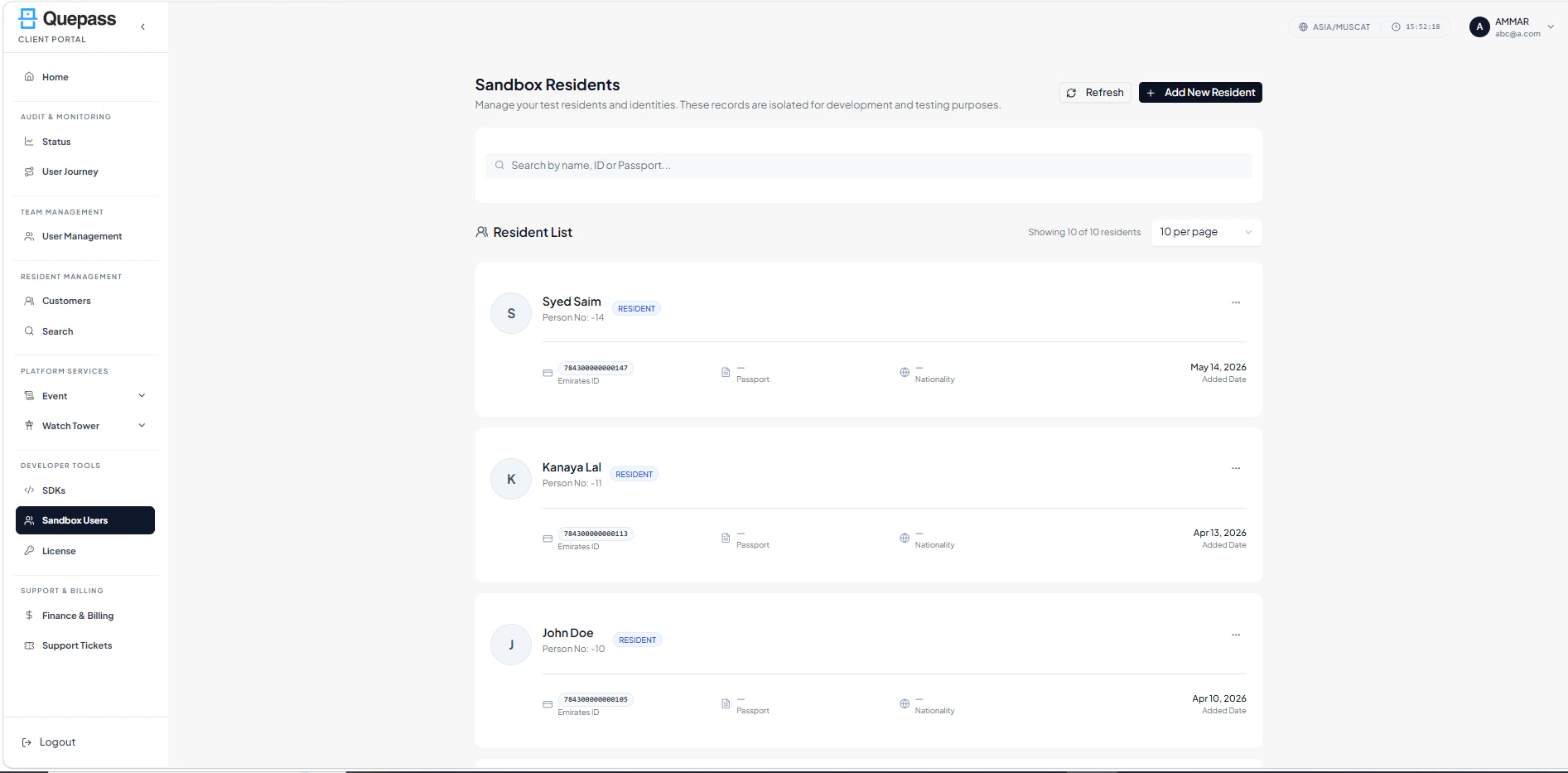
1. Sandbox Residents Interface
The Sandbox Residents interface provides search functionality, resident listing, and resident management controls in a clean, structured layout. The layout includes:- Search bar (Search by name, ID, or Passport)
- Refresh button
- Add New Resident button
- Resident List section
- Records count display (e.g., Showing 6 of 6 residents)
- Per page selector (e.g., 10 per page)
2. Using the Sandbox Residents Module
The Sandbox Residents section allows clients to create, search, refresh, and manage test resident identities within a controlled environment.Search Residents
Clients can search sandbox residents using name or identity details. Steps:- Click inside the Search bar
- Enter:
- Resident Name
- Emirates ID
- Passport Number
- Matching results automatically appear in the Resident List

Refresh Records
The Refresh button allows users to reload the resident list and fetch the latest records. Steps:- Click Refresh
- The system reloads and updates the resident list

Add New Resident
Clients can create new sandbox residents for testing purposes. Steps:- Click Add New Resident
- Enter required details:
- Full Name
- Emirates ID
- Passport (if applicable)
- Nationality
- Other required identity fields
- Save the record
- The new resident appears in the Resident List

3. Resident List
All sandbox residents are displayed in a structured card layout. Each resident entry includes:- Profile Initial / Avatar — First letter of the resident name
- Full Name — Name of the resident
- Resident Tag — Role label (e.g., RESIDENT)
- Person No. — Internal reference number
- Emirates ID — Identity number (displayed if available)
- Passport — Passport information (if provided)
- Nationality — Resident nationality
- Added Date — Date the record was created
- More Options (⋯) — Additional actions (such as edit or delete, based on permissions)
- Total resident count
- Page size selection (e.g., 10 per page)

4. Operational Use Cases
The Sandbox Residents module is commonly used for:- Testing identity onboarding journeys
- Simulating verification and document validation flows
- Performing SDK and API integration testing
- QA validation before production release
- Training internal teams on resident workflows
- Demonstrating system capabilities to stakeholders