

A guide to managing and tracking participant registrations across client events within the Quepass platform. The Event Registrants section enables clients to monitor all event participants, review registration status, manage ticket types, and track check-in/check-out activity. It provides centralized visibility into attendee lifecycle and event access control. The Event Registrants module can be accessed from the Client Dashboard sidebar under Event → Registrants.Documentation Index
Fetch the complete documentation index at: https://docs.quepass.com/llms.txt
Use this file to discover all available pages before exploring further.
1. Event Registrants Interface
The Event Registrants interface combines summary metrics, filtering controls, and participant-level tracking in a structured layout. EventRegistrants The layout includes:- Summary metrics cards
- Top action controls
- Filters panel
- Registrant card listing

2. Using the Event Registrants Module
The Event Registrants section allows clients to manage and analyze event participants at both aggregate and individual levels.Top Controls
Located at the top of the screen: Refresh — Reloads registrant data to display the latest updates
Filtering Registrants
The Filters panel allows clients to quickly locate specific participants. Available filters include: Organization — Displays the organization whose registrants are being managed Event — Select a specific event to view only its participants UID — Search for a participant using their unique identifier More Options — Access additional filtering controls if available Apply Filters — Apply selected filters to refine the registrant list Registrant Filters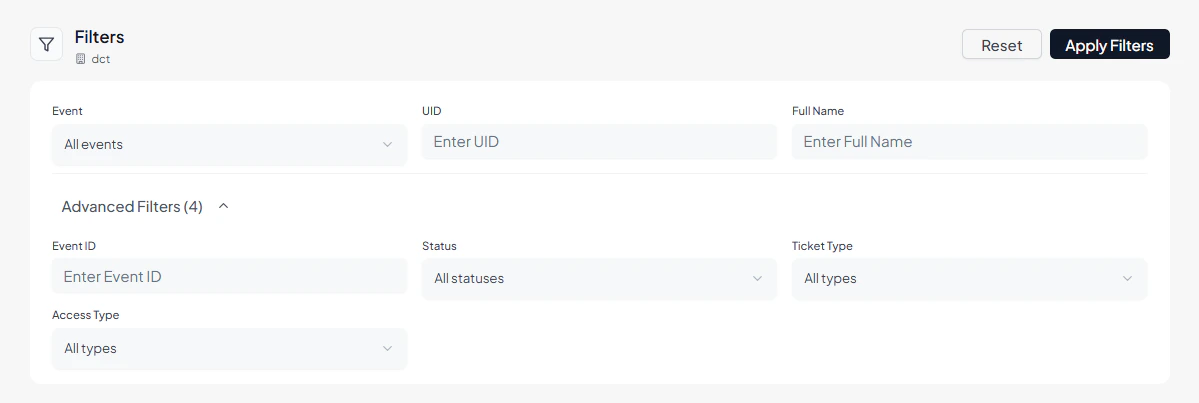
Reviewing the Registrant List
All registrants are displayed in a card-based layout, with each card representing a single participant. Each registrant entry includes: UID — Unique identifier of the participant Full Name — Registered participant name Event Name & Event ID — Associated event details Registration Status — Example: Confirmed Ticket Type — Example: Standard, VIP Access Type — Example: Single or Multiple access Check-in / Check-out Status — Indicates whether the participant has checked in or checked out Timestamp — Date and time of check-in or check-out activity Registrant Cards
3. Operational Use Cases
The Event Registrants module is commonly used for:- Monitoring event participation volume
- Tracking confirmed vs inactive registrants
- Managing ticket types (Standard, VIP)
- Validating access permissions (Single / Multiple entry)
- Reviewing real-time check-in/check-out activity
- Supporting on-ground event operations and access control