

1. Activity Logs Interface
The Activity Logs interface is structured to provide both filtering capabilities and detailed transaction visibility. ActivityLogs The layout includes:- Filters panel
- Search controls
- Activity record list
- Detailed activity view access

2. Using the Activity Logs Module
The Activity Logs section allows clients to analyze transaction data at both summary and detailed levels.Page Sections
The Activity Logs page is divided into two main parts to help clients efficiently monitor all transactional and event-related activities:- Activity Logs — Provides detailed transaction-level visibility, including session information, verification outcomes, and journey-specific data.
- Event Activity — Displays high-level event-related activities and notifications, giving clients insights into system-generated or platform-triggered events related to user actions.
Filtering & Searching Transactions
Clients can refine transaction results using the following controls: UID — Search transactions associated with a specific user identifier Session ID — Filter records for a particular session More — Access additional filtering options for deeper analysis Apply Filters — Apply selected filter criteria Clear — Reset all applied filters Activity Filters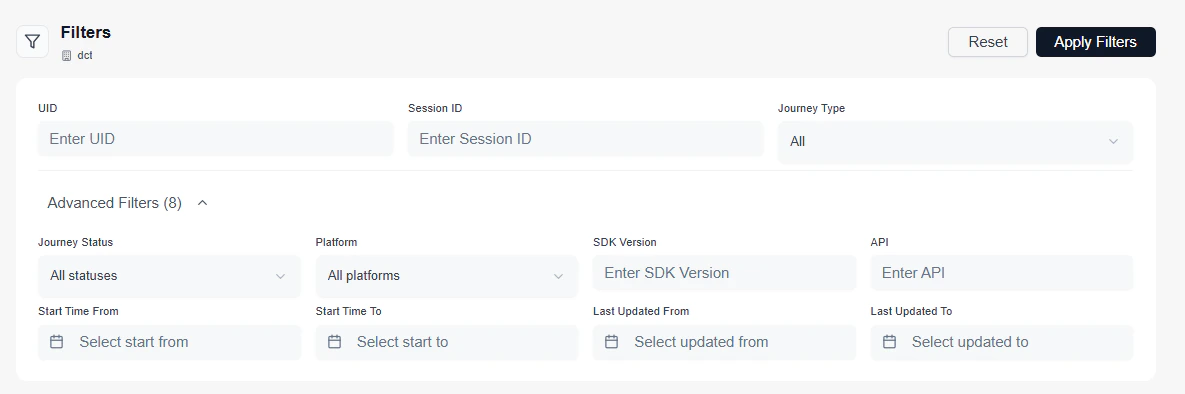
Reviewing Activity Records
The main list displays individual transaction activity records. Each entry includes: Session ID — Unique identifier associated with the transaction session UID — User identifier linked to the journey (if available) Journey Type — Type of workflow executed (e.g., Onboarding) Status — Outcome of the transaction (e.g., Verified, Failed) Score — Confidence score for biometric or document verification Time — Timestamp when the transaction occurred Activity Records
Viewing Activity Details
Clicking on any activity record opens a detailed view of the selected transaction. The detailed view may include:- Full verification results
- Step-by-step journey progression
- Biometric or document validation details
- Confidence score breakdown
- Session metadata

- Transaction investigation
- Verification score validation
- Compliance review
- Debugging integration issues
- User journey analysis
3. Operational Use Cases
The Activity Logs module is commonly used for:- Reviewing verification outcomes
- Investigating failed or suspicious transactions
- Validating biometric confidence scores
- Tracking session-based activity
- Auditing onboarding and authentication flows
- Supporting compliance and reporting requirements