

A guide to tracking, managing, and resolving support tickets within the Quepass platform. The Support Center section enables clients to submit support requests, monitor ticket status, and interact with the support team. It provides centralized visibility into ticket progress, priority, and resolution timelines. The Support Center module can be accessed from the Client Dashboard sidebar under Support Tickets.Documentation Index
Fetch the complete documentation index at: https://docs.quepass.com/llms.txt
Use this file to discover all available pages before exploring further.
1. Support Center Interface
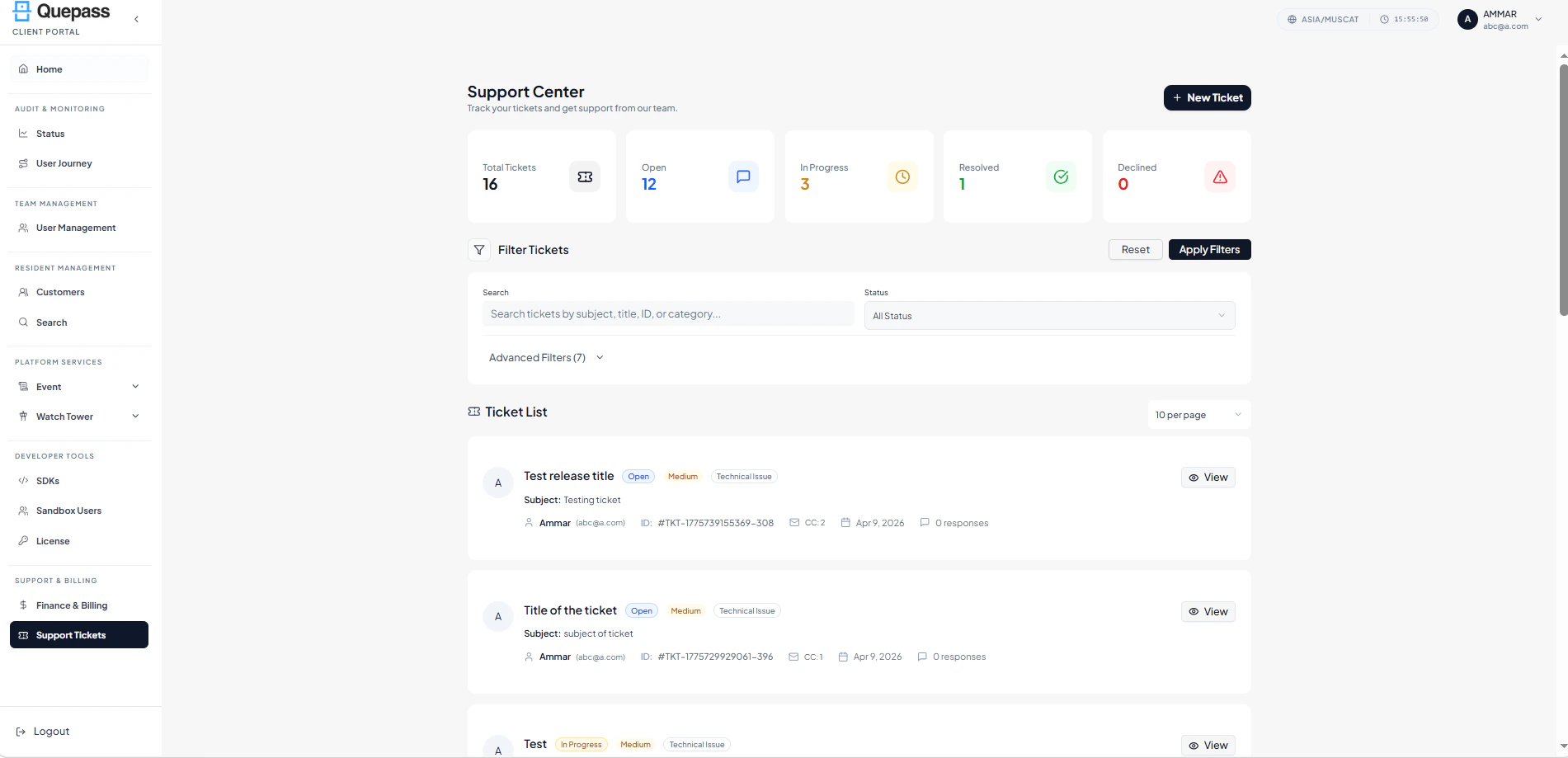
The Support Center interface combines summary metrics, filtering controls, and ticket-level tracking in a structured layout. SupportCenter The layout includes:- Summary metrics cards
- Top action controls
- Filters panel
- Ticket card or table listing
2. Using the Support Center Module
The Support Center section allows clients to manage support tickets at both aggregate and individual levels.Summary Metrics
The top section displays key ticket statistics: Total Tickets — Total number of tickets submitted by the client account Open — Tickets that are newly submitted and awaiting action In Progress — Tickets currently being addressed by support staff Resolved — Tickets that have been successfully resolved Declined — Tickets that were rejected or closed without resolution
Creating a New Ticket
Clients can submit a support request using the New Ticket button located at the top-right corner of the page. Steps:- Click New Ticket
- Fill in ticket details such as subject, description, and category
- Submit the ticket for review by the support team

Search & Filters
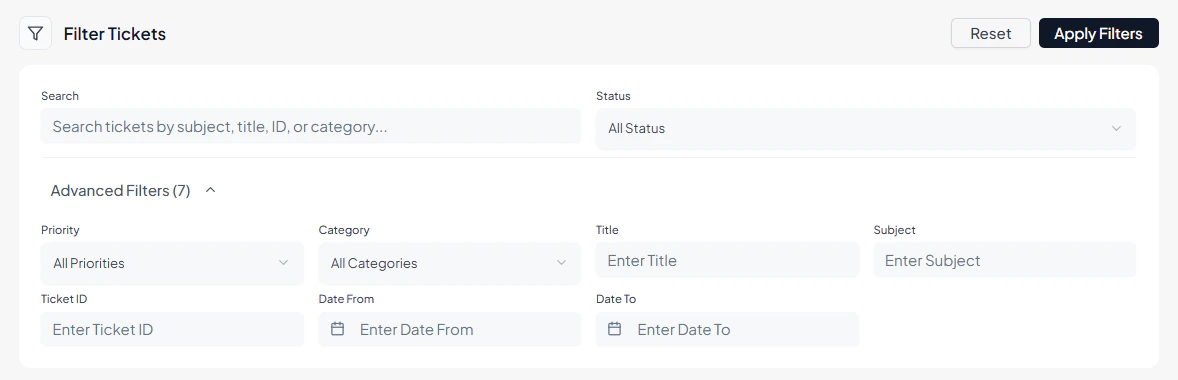
The Filters panel allows clients to locate specific tickets efficiently. Available filters include:- Search — Search tickets by subject, title, ID, or category
- Status — Filter tickets by Open, In Progress, Resolved, or Declined
- Advanced Filters — Additional criteria to narrow down the ticket list
Reviewing the Ticket List
All tickets are displayed in a structured card-based layout, with each entry representing a single support request. Each ticket entry includes: Ticket Title — Displays the main title of the support ticket Status — Indicates the current ticket state such as Open or In Progress Priority Level — Displays the ticket priority level (Example: Medium) Issue Category — Displays the issue classification such as Technical Issue Subject — Brief description or subject line associated with the ticket Requester Information — Displays the requester name and registered email address Ticket ID — Unique identifier assigned to the ticket CC Count — Displays the number of copied recipients associated with the ticket Submission Date — Date when the ticket was created Response Count — Displays the number of responses added to the ticket View — Opens the complete ticket details and conversation history Ticket List
3. Operational Use Cases
The Support Center module is commonly used for:- Submitting new support tickets for technical or operational issues
- Tracking the status of submitted tickets in real time
- Filtering tickets by status, category, or search criteria
- Viewing detailed ticket information and conversation history
- Downloading ticket records for compliance or reporting purposes
- Ensuring timely resolution of client issues through structured monitoring